
See the whole picture.
Coach the next step.
On game day
Keep your attention
on the players.
Who needs a break? Who needs more time? See the whole team, make your next substitution, and get back to coaching.
- Give every player their minutes
Track time on the field and on the bench. Suggested rotations help you make the call with the full picture in front of you.
- See beyond a single game
Review playing-time history across the season. Notice who needs more opportunity and bring that context to your next plan.
- Keep coaching when the signal drops
The game clock, substitutions, goals, and stats work offline and sync when you reconnect.
Every minute matters
Season viewHow can Riley get more time on the field?
Development leads.
Results follow.
A score tells you what happened. Your coaching shapes what happens next.
Keep participation, learning, and confidence at the center. Game results are a lagging indicator of progress—not the only measure of a good season.
Turn what you notice
into what you do next.
Data gives you context. Intelligent planning helps turn that context into a session your team can use.
Observe
Review playing time, game events, and what you noticed on the sideline.
Plan
Choose a focus. Build a session yourself or ask your AI assistant to help.
Practice
Show the drill, run it on the clock, and adapt to the players in front of you.
Keep growing
Give players a next step with take-home exercises, then build on what you learn.
Intelligent planning.
Your coaching judgment.
Connect your AI assistant to your team’s context. Ask for a practice plan with animated drills, review it, and make it your own before you run it.
“Help me plan a practice that gives everyone more touches and time to try.”Connect your assistant
AI is optional. Basic schedule and player tasks are free; AI plans and deeper analysis require Lineup Pro.
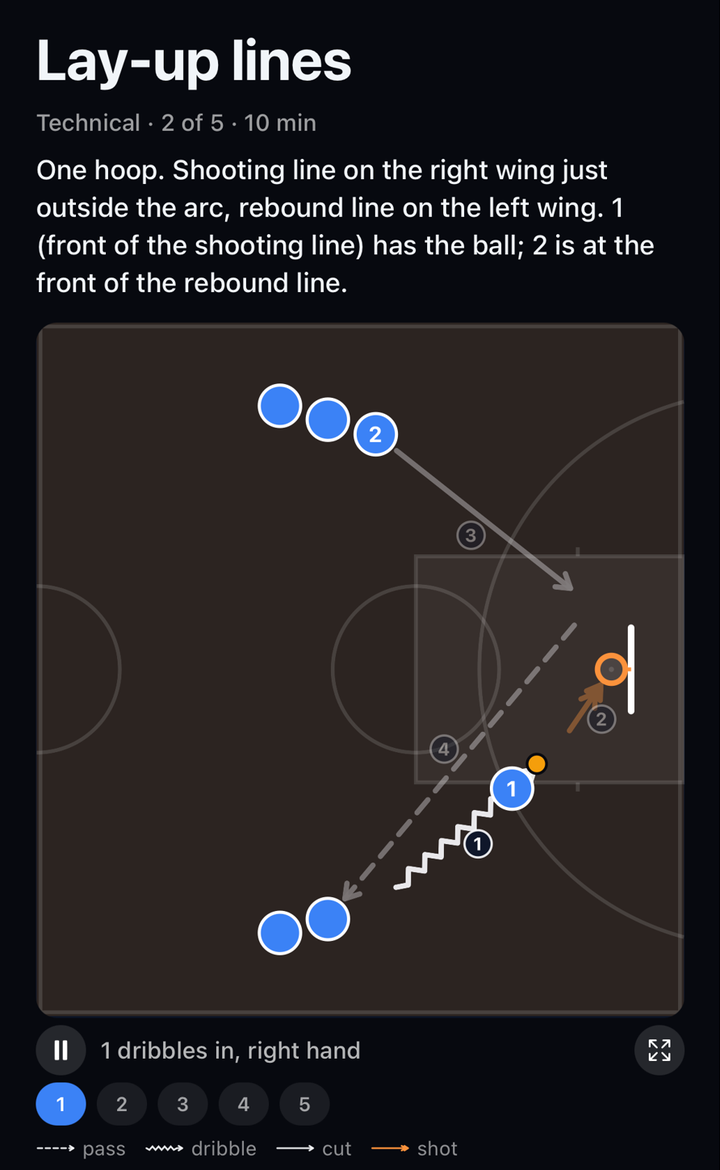
Illustrative drill. Press play to see the pass and support run.
At practice
A clear plan.
More room to coach.
Start with a soccer or basketball template, build from the drill library, or use a plan from your connected assistant.
- Show the movement
Animated drill diagrams help players see the setup and understand what to try.
- Stay with your players
Run each drill with a countdown and follow the clock on your lock screen.
- Keep your staff together
Assistant coaches can follow the same practice clock, so the whole session stays in step.
Between sessions
Give progress
somewhere to go.
Assign take-home exercises to the team or individual players. Families can see what to work on and log sessions, giving you more context for the next practice.
A useful next step for each player. A clearer way for parents to help.
A little practice.
A little more confidence.
Parents log sessions. Coaches see participation and plan the next step.
Start with your team.
Grow from there.
Core coaching tools are free. Add Lineup Pro when you want AI planning and deeper analysis.
Free for coaches
The tools you need to run your team and your next game.
- Teams, rosters, and assistant coaches
- Game clock and substitution tracking
- Playing-time history and team schedules
- Practice planning and the practice runner
- Free AI connection for team schedules and player management
Lineup Pro
AI practice plans and deeper analysis for coaches. More context for families.
- For parents: the team’s playing time, live game board, stats, and final scores
- For coaches: AI practice and game plans with animated diagrams, plus deeper stats analysis
Eligible accounts can try Pro free for 7 days. Purchase in the iPhone app, or use secure web checkout when offered. Eligibility, renewal price, and trial terms are shown before subscribing. Cancel before the trial ends to avoid automatic renewal.
See how the AI connection worksWhich sports and formats are supported?
Soccer (5v5, 7v7, 9v9, 11v11), basketball (3v3, 4v4, 5v5), flag football (5v5, 7v7), hockey (4v4, 5v5, 6v6), and lacrosse (7v7, 10v10, 12v12). Practice templates currently focus on soccer and basketball.
Can assistant coaches help run the team?
Yes. Share a coach invite code or QR code to add assistants. Each team supports an owner and up to two assistant coaches.
Do I need AI to use Magic Lineup?
No. You can manage your team, run games, track minutes, and build practice plans in the app. Connecting an AI assistant is optional. Basic schedule and player tasks are free; AI practice planning and deeper analysis require Pro.
What can parents see for free?
Invited parents can follow the schedule, see their own child’s minutes from the latest completed game, and view and log their child’s take-home exercises. Lineup Pro unlocks the broader team view, including historical playing time, the live board, stats, and scores.
Good coaching
keeps learning.
Practical reading for the decisions, conversations, and sessions that shape a team.
Run practice from your phone without being on your phone.
Drill diagrams, a shared clock, and a plan that keeps the session moving.
The sideline conversationHandle playing-time conversations with a clearer picture.
A practical way to talk about minutes, expectations, and the whole season.
Every player.
Part of the plan.
Bring data, intelligent planning, and your coaching together.